




Creating a Disaster Readiness Plan
There are a number of ways to go about creating your plan. My advice to you is pretty simple—find one that appeals to you and then use it. But unless you borrow someone else’s plan, or hire an expert to create one for you, you will be making your own. In the coming pages, I’m going to outline a process on how to make your own disaster plan.
Playing the “What if” Game
Grab a pen and two pads of paper. If you’re doing this by yourself, find a quiet time and place in your office to begin the process. If you’re doing it as part of a team, make sure the team is focused and without distractions for the next hour or so. By following the steps listed below, you should find that your efforts will yield a quite workable disaster plan for your office.
- At the top of one of the notepads, write the word “Procedures.” On the other notepad, write the word “Stuff.”
- On the “Procedures” notepad, list all the possible things that could go wrong in your office. For each item, create a way (and if you can, more than one way) to alleviate that situation. For example, suppose you wrote down “plumbing failure floods the office.”Alongside that entry, write down your options to get things back on track. Options might include identifying an alternative workspace to use while the mess is being cleaned (don’t forget to identify where that place might be!) and contacting a remediator to repair any waterlogged hard files and a computer repair outfit to repair damaged hardware.
- Every time you come up with a problem and a procedure to fix it, take your “Stuff” notepad and list the things you would need to implement your procedure. In the previous example, some of the stuff you might need could include plastic sheeting, a wet/dry vacuum (which could be purchased relatively inexpensively or rented from home improvement stores), and duct tape. The list should include the phone numbers of various vendors who could help you after a disaster.
- Continue to do this over and over again until you’re convinced you’ve captured every conceivable scenario, both large and small.
- Once you’re satisfied that you’ve completed your lists, go back through them and ask yourself, “What would happen if my proposed solution became unworkable?” For example, suppose the ensuing water damage from the plumbing failure made the file room unsanitary and thus uninhabitable, as well as making the contents of the room unsafe to handle. What would your procedure be for that situation?
- Once you’ve come up with some workarounds for when your first response to a problem doesn’t work, you’re ready to start writing your “preparedness story.” Your preparedness story need not be long; a page or two should more than suffice to cover all the bases. The preparedness story is simply a synopsis of how you would handle disasters. Your story may sound something like this:[box]To ensure that we keep our clients apprised of our situation, we’ve created a standard notebook, shared with key attorneys, setting forth the instructions on how best to advise our clients of our new office space and contact information. The checklist in that book also reminds the attorneys to notify the local courts where we practice of our situation and how best to contact us.
We expect employee morale issues might result from a disaster. To that end, we have appointed two attorneys, noted for their people skills, to act as the primary points of contact for our associates and staff.[/box][box]To ensure business continuity, we regularly back up all of our computer hard drives with portable hard drives, which we remove from the premises on completing the backup. We’ve acquired recovery supplies, such as plastic sheeting, rope, duct tape, caulk, trash bags, and a wet/dry vacuum. We keep some of these supplies on site for a rapid response; other supplies, such as our wet/dry vacuum, belong to one of the attorneys and remain at his house.
In the event we need to relocate somewhere else while our office is being repaired, we’ve established an agreement with another law firm a few blocks away allowing us to use their unused office space and conference rooms until we can acquire additional space.
-
Once you’ve written your preparedness story, share it with others. Remember, there’s no attorney-client privilege here; your plan should not be treated as proprietary information. Have your attorneys and other law firms’ attorneys and staff review it for you and offer suggestions. With any luck, your efforts may encourage them to begin their preparedness efforts as well.
Creating your Incident Response/Business Continuity Team
You cannot do everything yourself. There is too much to do after a disaster, with too few resources, by people who are not trained in emergency management and disaster recovery, for one person to do everything. Thus, you will need to create a team of people to help respond to disaster.
Many of you in small firms will feel that you do not have enough people to create a team. Note that the team need not be large; however, it does need to involve more than one person, unless you are the sole employee of the firm. Even then, you may find it helpful to conscript family members or a temp agency to help you.
There are a number of ways to organize your team and divide up responsibilities. It’s not my goal to prescribe one method over another; rather, you need to figure out what works best for your business. Here are some things you might want to consider:
- Who in your office performs well under pressure? Such people, regardless of their skill sets, make good team members.
- Who in your office is a “people person”? Someone will need to communicate with the firm’s employees on a regular basis, fielding their questions, reassuring them, and encouraging them to focus on the various tasks at hand. If you have someone who is adroit with people issues, that person would undoubtedly be a great asset to your team.
- Delegation and clear communication are critical. Certain people need to be given certain tasks, based on their abilities and skill sets. Further, simply telling your team members to “call the insurance agent after the disaster” may not be sufficient to get it done. On the other hand, specifying that “Ryan or John will call the insurance agent” narrows down who will have that responsibility.
- It is important to share knowledge and to possibly appoint backups for the various team members.All members of the team should have a copy of the plan. It may be that some members of the team, for any number of reasons, will not be able to participate in the response or recovery of the business. If they are injured or cannot get to the office, for example, someone will have to fill in for them. If everyone has a copy of the plan, then each team member will have at least a working knowledge of what the other team members are supposed to do.
Once you’ve identified the team’s members, it’s time to record this list. On a sheet of paper, create your “roster.” Your roster should list all of your team members and all of their responsibilities. It will also tell the reader what your business will do in the event of an emergency. For example, your roster may look something like this:[box]Our business’s incident response/business continuity team consists of Jeff (principal), Tammy (office manager), and Jill (secretary). The firm’s managers will activate the team if they decide a situation warrants it.
Once activated, this team has full responsibility to manage all operations of the firm. Jeff, as a partner in the firm, will be in charge of the team’s efforts. His primary responsibilities are, but are not limited to—
1. advising the courts of our firm’s situation, if warranted;
2. advising clients of our situation, if warranted;
3. identifying alternative workspace for temporarily relocating the firm’s operations, if needed; and
4. ensuring that timekeepers continue to maximize billable hours and receivables during the crisis, to the extent possible.
Tammy, as office manager, will be responsible for all human resource issues involving nonattorney employees. She is also authorized to instruct the firm’s staff to take whatever remedial or mitigation efforts are necessary to protect the firm’s information and physical assets. She has a budget of $5,000 to secure any needed resources, such as office supplies, vendors, and staff overtime. She need not seek management approval to use any money budgeted during the time the team is activated. Any expense items over $2,000, however, must be approved by firm leadership.
Jill will act as team leader for all support operations. She will marshal and manage staff employees who are able to come to work and who can help carry out the necessary tasks of mitigation.[/box]
Creating Your Own Procedures
Simply put, procedures that are not written down don’t exist. You will not have the time nor the frame of mind to remind people of all of the necessary procedures in the middle of an emergency.
The good news is that there are only two rules in creating incident response/business continuity procedures. First, write your procedures simply so that anyone can understand them. Bear in mind that it may be a sixteen-year-old child of one of your employees who is pressed into action to help the firm recover. That individual needs to be able to look at the plan, read a portion of it, and then have a full understanding of what has to happen. You cannot write a plan that is too simple. We are not trying to insult anyone’s intelligence here; however, we have to be mindful that we’re dealing with a stressful situation and with individuals who are not trained in incident response or business continuity.
Second, remember that the scenario you actually face will be different from any scenario you may have concocted, so make your plan flexible.Military history is replete with battle plans that were changed early on in the fight. That’s because it’s simply not possible to forecast and predict with any accuracy every single variable. For example, if your plan calls for you to move your office operations into a conference room of another law firm ten blocks down the street, one of the implied conditions would be that the other law firm’s office be accessible. However, if it’s difficult or impossible to get to the other law firm, that part of your plan isn’t going to work. So for that scenario, it would be good to have multiple locations in mind to meet your firm’s needs.
Now that you’ve created the framework of a disaster plan, you are in a far better position to deal with whatever might come up. It’s this planning process—and not the plans themselves—thatwill better prepare your firm and your people for the prospects of a disaster.
Plan Format
We hit our first question in the decision tree right away. Do we use hard copies of the plan, soft copies of the plan, or both?
Hard Copy Pros and Cons:
- Hard copies need no electricity or technology.
- Hard copies take up space.
- Hard copies are a pain to update since you have to change every single copy.
- Hard copies provide no inherent security as to their contents (which may be desired as some portions of the plan might contain proprietary information, such as employees’ addresses and phone numbers).
Soft Copy Pros and Cons:
- Soft copies can be put on a thumb drive and attached to a keychain for ease of use.
- Soft copies are easy to update.
- Soft copies can be password protected (to maintain the security of any proprietary information contained in the plan, as mentioned above).
- Soft copies require computers and electricity to access.
- Thumb drives and external hard drives can crash, making the plan inaccessible.
Emergency Instructions for Employees
Each member of your organization should have a short, half-page memo detailing what to do in case of fire, severe weather, or other emergency. It should contain the emergency contact numbers for them to call to get further instructions in the event of an emergency.
Emergency Contact Information
You need to know how to get in touch with your employees, preferably through multiple means. This means having not only their names, phone numbers, and physical home addresses, but their “in case of emergency” contacts as well. The growing practice of abandoning traditional landlines at home in favor of a cell phone means we have one less means of getting in touch with our employees. On the upside, having the ability to send text messages adds a new dimension to our emergency communications.
Phase Checklists
You need to have some protocols to follow both pre- and post disaster. Write out steps to follow and in what order. Grouping these activities into phases makes it easier for everyone to know what activities need to be done and when to do them.
Outline of Ongoing Precautions
What are you doing daily or weekly to prepare for a disaster? For example, what’s the plan for backing up computer data? How often do you review the red folder to update it? Outline your ongoing precautions so you can have a clear list of those activities.
Special Considerations for Certain Scenarios
Some scenarios don’t lend themselves well to the phase checklists mentioned above. Catastrophic events come to mind. Write out special instructions for those scenarios that require it.
Solutions for Possible Problems
A disaster is a disaster is a disaster. For example, if your building is destroyed, does it matter if it was destroyed by fire or weather? If you’re having communications issues with your staff post disaster, does it matter if those issues were caused by a plumbing failure requiring an office evacuation or a shooting in the work place? You will find that a number of the problems you are trying to solve are identical across the spectrum of the possible disasters that could affect a law office. Take advantage of that and prepare some suggestions on how to handle common problems that might come up post disaster.
Identification of Alternative Work Sites
Quick—the building just blew up. Where do you plan to go to work tomorrow? Think about alternative work site issues now and have the possible solutions written down. If you have arranged with another business to partner with them in the event of a disaster to either business, be sure to put in the plan where that business is located. In addition, think about where you plan to receive mail and to fax documents, if needed. Write down the names and locations of the places where you can do those things, too.
Plans for Accountability/PAR
In the aftermath of a disaster, one of your first orders of business will be to determine the status and location of your staff. First responders often refer to this as taking a personnel accountability report or “PAR.” Taking a PAR is a high priority. Think about how you want to go about doing that. Also, for offices where attorneys regularly leave the office for meetings, court appearances, depositions, and travel, how will you determine their whereabouts?Work through those issues and incorporate them into your red folder.
Launch Code Cards
Every U.S. president has access to the nuclear weapons launch codes. These codes appear on a card kept constantly close to the president by the military. You should also have your own version of a launch code card available to you at all times.
Your launch code cards enable you to “launch” your incident response or business continuity plans. I created launch code cards for our emergency responders, giving them the basic information they need to get started in the crisis management process. A launch code card might look something like this:
Click to ExPand
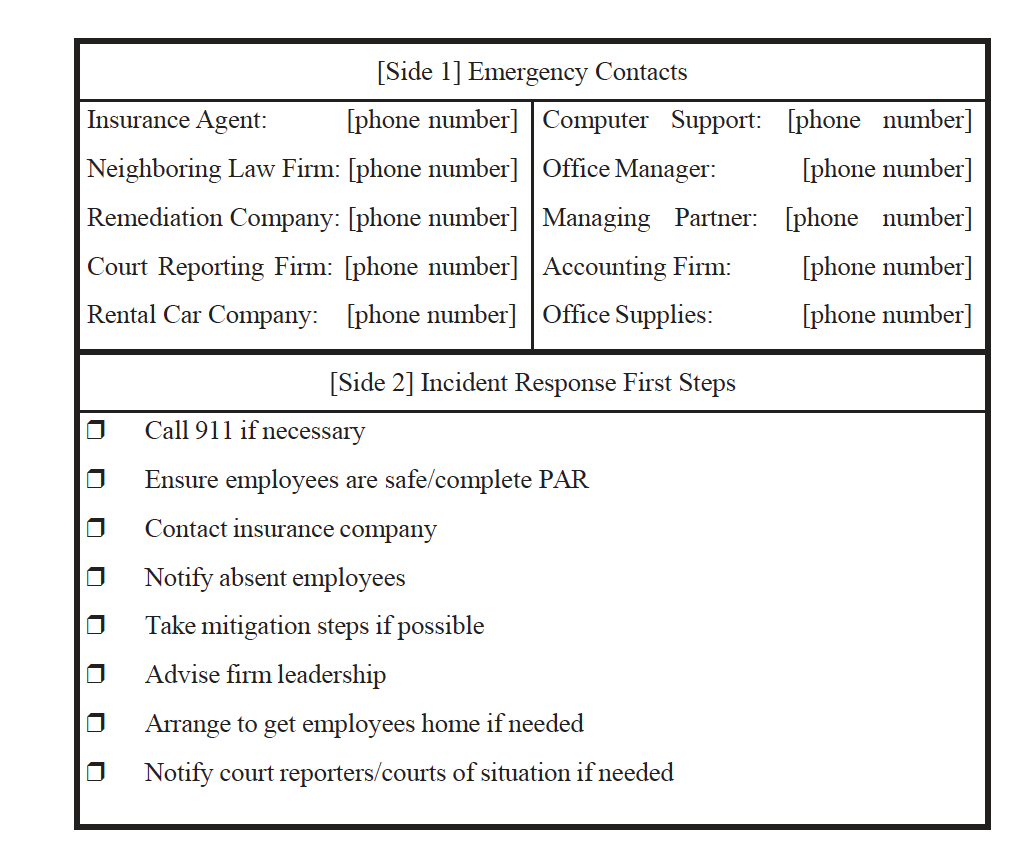 This launch code card will help you get your head into the game, so to speak. Make it a credit card-sized list, and then laminate it. Put it in your wallet or purse so that it’s always with you.



 LPM Help Center
 Online Subscriptions
 Texas Bar Books